Admin Panel
createAdminRouter mounts a self-contained admin dashboard — both a REST API and a built-in vanilla-JS UI — at any path. No external frontend build step required.
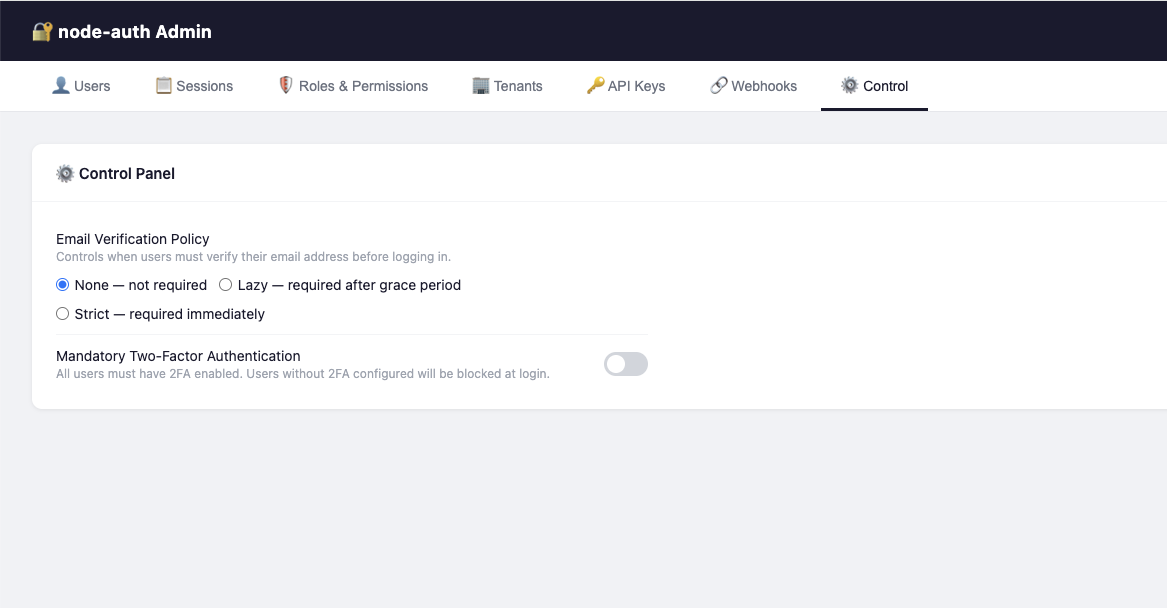
The built-in Admin Panel — no dependencies, no build step - Control Tab
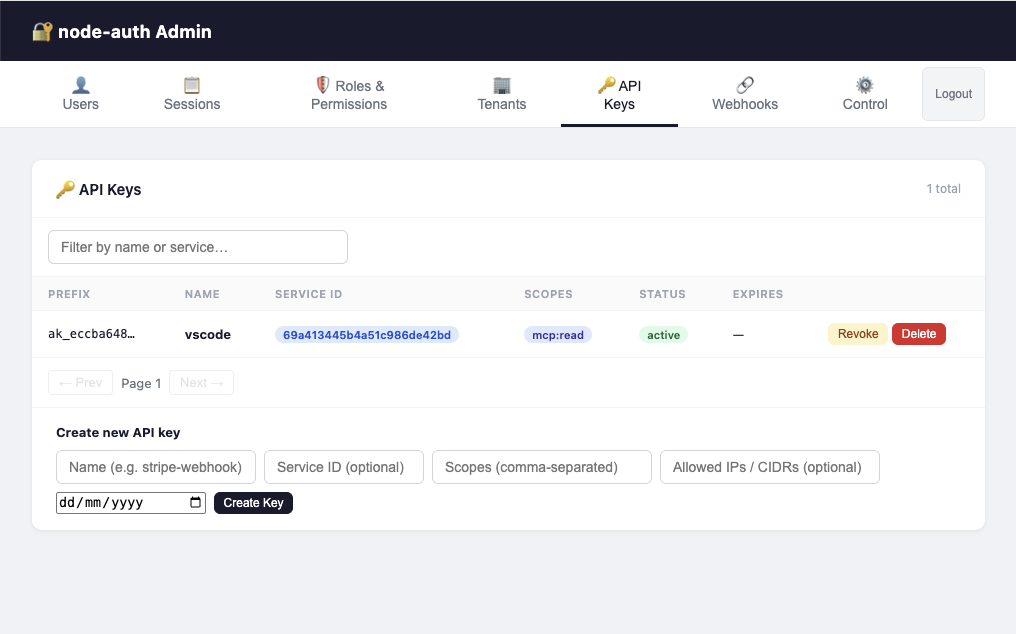
The built-in Admin Panel — no dependencies, no build step - Api Keys Tab
Admin authentication flow (v1.8.2+)
Setup
Step 1: Import and mount the admin router.
import express from 'express';
import { AuthConfigurator, createAdminRouter } from 'awesome-node-auth';
import type { AdminOptions, AdminAccessPolicy } from 'awesome-node-auth';

const app = express();
app.use(express.json());

const auth = new AuthConfigurator(config, userStore);
app.use(auth.buildAllRouters({
  admin: {
    // Session-based access control (v1.8.0+)
    accessPolicy: 'first-user', // see Access Policy section below
    sessionStore,         // optional — enables Sessions tab
    rbacStore,            // optional — enables Roles & Permissions tab
    tenantStore,          // optional — enables Tenants tab
    userMetadataStore,    // optional — enables Metadata editor per user
    settingsStore,        // optional — enables Control tab (email policy, 2FA policy)
    linkedAccountsStore,  // optional — shows Linked Accounts in user detail
    templateStore,        // optional — enables 📧 Email & UI templates tab
  },
}));

app.listen(3000);
Step 2: Open the admin UI in your browser.
http://localhost:3000/admin/
Authentication Fallback
By default, if you are not authenticated, the Admin UI will serve its own built-in login form (Email + Password) that speaks directly to your /auth/login endpoint. This allows for a zero-configuration admin panel even in headless or API-only projects.
If you prefer to use your own application's login page, you can configure the loginPath option (see below).
Access Policy
The accessPolicy option controls who may access the Admin UI and REST API:
| Policy | Description |
|---|---|
'first-user' | Only the first registered user (lowest-index in listUsers) is granted access. Ideal for single-owner setups. |
'is-admin-flag' | Only users with BaseUser.isAdmin === true are granted access. |
'open' | No restriction — all authenticated users are granted access. Use only behind a VPN or IP allow-list. |
(user, rbacStore?) => boolean | Custom async predicate — return true to grant access. |
Configuration Options (AdminOptions)
| Option | Type | Description |
|---|---|---|
accessPolicy | AdminAccessPolicy | Required. Defines who can access the panel. |
jwtSecret | string | Required (if not open). Must match AuthConfig.accessTokenSecret. |
loginPath | string | Optional. Path to redirect unauthenticated browser requests. If omitted, uses the built-in login form. |
apiPrefix | string | Optional. The base path where the main Auth router is mounted (default: /auth). Used to resolve profile links. |
cookiePrefix | string | Optional. Explicit prefix for auth cookies (e.g., __Host- or __Secure-). Automatically detected if omitted. |
rootUser | RootUser | Optional. An emergency { email, passwordHash } (bcrypt) that bypasses the userStore for Admin login. |
adminSecret | string | Optional (Legacy). If set, the login form allows "Bootstrap Mode": leave email blank and log in with just this password. |
swagger | boolean | Optional. Enable the built-in Swagger UI at /admin/swagger. |
...stores | IStore | Optional. Pass various stores (RBAC, Sessions, etc.) to enable corresponding tabs. |
Example: custom predicate using RBAC
app.use('/admin', createAdminRouter(userStore, {
  accessPolicy: async (user, rbacStore) => {
    if (!rbacStore) return user.isAdmin === true;
    return user.roles.includes('superadmin');
  },
  jwtSecret: process.env.ACCESS_TOKEN_SECRET!,
  rbacStore,
}));
Two login endpoints, two audiences
/auth/ui/login— end-user login/auth/admin/login— admin panel login
Link customers to /auth/ui/login. The admin login form is only for operators managing the dashboard.
adminSecretIf you are upgrading from v1.7 or earlier, adminSecret has been removed in v1.8.0. You must switch to accessPolicy + jwtSecret as shown in the Setup section above. This change enables more granular security and better integration with your application's session system.
Mount the admin panel behind a VPN, IP allowlist, or internal-only network in production. The panel has full read/write access to users, sessions, roles and settings.
Bootstrap & Root Access
Version 1.8.2 introduces two ways to access the Admin UI without having a pre-existing user in your database:
1. Root User (Recommended)
Pass a bcrypt-hashed password hash to AdminOptions.rootUser. This user is "virtual" — they don't exist in your IUserStore, but can log in to the Admin UI to perform initial setup.
app.use('/admin', createAdminRouter(userStore, {
  accessPolicy: 'first-user',
  jwtSecret: process.env.ACCESS_TOKEN_SECRET!,
  rootUser: {
    email: 'admin@internal.com',
    passwordHash: '$2a$10$xxxxxxxxxxxxxxxxxxxxxxxxxxxxxx', // bcrypt hash
  }
}));
2. Bootstrap Mode (Password-only)
If adminSecret (legacy) is configured, the built-in login form allows you to leave the email empty and log in using only the secret as the password. This is useful for first-time setup in environments where no users have been created yet.
Once logged in, you can create your first "real" admin user and then remove the adminSecret.
Dashboard Tabs
Each tab is activated automatically when you pass the corresponding store:
| Store / Option | Unlocks |
|---|---|
sessionStore | Sessions tab |
rbacStore | Roles & Permissions tab |
tenantStore | Tenants tab |
userMetadataStore | Metadata section in user detail |
settingsStore | ⚙️ Control tab |
linkedAccountsStore | Linked Accounts column |
apiKeyStore | 🔑 API Keys tab |
webhookStore | 🔗 Webhooks tab |
templateStore (on AuthConfig) | Email & UI tab |
uploadDir + uploadBaseUrl | Logo upload in branding |
| Tab | Required store | Features |
|---|---|---|
| Users | IUserStore.listUsers | Paginated user table, search by email, delete users, open Manage panel |
| Manage (per-user) | — | View profile, reset password, revoke refresh token, toggle email verification, toggle 2FA |
| Sessions | ISessionStore | All active sessions across all users; revoke by session handle |
| Roles & Permissions | IRolesPermissionsStore | List roles, create/delete roles, assign permissions |
| Tenants | ITenantStore | List tenants, create/delete tenants, manage members |
| Linked Accounts | ILinkedAccountsStore | View OAuth provider links per user |
| 🔗 Webhooks | IWebhookStore | Manage outgoing webhooks and inbound dynamic execution configs |
| ⚙️ Control | ISettingsStore | Toggle email verification mode (none/lazy/strict), 2FA policy, and global webhook action enablement |
| 📧 Email & UI | ITemplateStore | Live editor for email templates (HTML/Text + per-language translations) and UI i18n strings |
Settings Store
The Control tab lets admins change runtime auth policy. Implement ISettingsStore:
import { ISettingsStore, AuthSettings } from 'awesome-node-auth';

// Simple in-memory implementation (replace with DB in production)
let settings: Partial<AuthSettings> = {};

const settingsStore: ISettingsStore = {
  async getSettings(): Promise<Partial<AuthSettings>> {
    return { ...settings };
  },
  async updateSettings(patch: Partial<AuthSettings>): Promise<void> {
    Object.assign(settings, patch);
  },
};
Then pass it to both AuthConfigurator and createAdminRouter:
const auth = new AuthConfigurator(
  { ...config, settingsStore },
  userStore
);

app.use('/admin', createAdminRouter(userStore, {
  accessPolicy: 'first-user',
  jwtSecret: process.env.ACCESS_TOKEN_SECRET!,
  settingsStore,
}));
REST API Reference
All admin endpoints require a valid JWT access token in Authorization: Bearer <token>.
| Method | Path | Description |
|---|---|---|
GET | /admin/api/users | List users (paginated, ?offset=0&limit=20&filter=email) |
GET | /admin/api/users/:id | Get user details |
DELETE | /admin/api/users/:id | Delete user and all related data |
GET | /admin/api/users/:id/metadata | Get user metadata key/value pairs |
PUT | /admin/api/users/:id/metadata | Set/update user metadata |
GET | /admin/api/users/:id/linked-accounts | List OAuth provider links for user |
GET | /admin/api/users/:id/roles | List roles assigned to user |
POST | /admin/api/users/:id/roles | Assign a role to user |
DELETE | /admin/api/users/:id/roles/:role | Remove a role from user |
GET | /admin/api/users/:id/tenants | List tenants the user belongs to |
POST | /admin/api/2fa-policy | Batch-enable or disable 2FA for users |
GET | /admin/api/sessions | List all active sessions |
DELETE | /admin/api/sessions/:handle | Revoke a session by handle |
GET | /admin/api/roles | List all roles |
POST | /admin/api/roles | Create a new role |
DELETE | /admin/api/roles/:name | Delete a role |
GET | /admin/api/tenants | List all tenants |
POST | /admin/api/tenants | Create a tenant |
DELETE | /admin/api/tenants/:id | Delete a tenant |
GET | /admin/api/tenants/:id/users | List users in a tenant |
POST | /admin/api/tenants/:id/users | Add a user to a tenant |
DELETE | /admin/api/tenants/:id/users/:userId | Remove a user from a tenant |
GET | /admin/api/settings | Get current auth settings |
PUT | /admin/api/settings | Update auth settings |
GET | /admin/api/templates/mail | List all mail templates |
POST | /admin/api/templates/mail | Create or update a mail template |
GET | /admin/api/templates/ui | List all UI translation sets |
POST | /admin/api/templates/ui | Create or update UI translations for a page |
GET | /admin/api/ping | Health check |
Customising listUsers
The Users tab requires a listUsers method on your IUserStore. Add it to your implementation:
import { IUserStore, BaseUser } from 'awesome-node-auth';

export class MyUserStore implements IUserStore {
  // ... other methods ...

  async listUsers(limit: number, offset: number): Promise<BaseUser[]> {
    const query = db('users');
    return query.offset(offset).limit(limit);
  }
}
🔗 Webhooks tab
The Webhooks tab is enabled by passing an IWebhookStore to createAdminRouter. It manages both outgoing and inbound webhooks — they are fundamentally different in purpose and configuration.
app.use('/admin', createAdminRouter(userStore, {
  accessPolicy: 'first-user',
  jwtSecret: process.env.ACCESS_TOKEN_SECRET!,
  webhookStore: myWebhookStore,   // enables the Webhooks tab
  settingsStore: mySettingsStore, // enables the Control tab (for global action toggles)
}));
Outgoing webhooks (library → external service)
Outgoing webhooks forward AuthEventBus events to external HTTP endpoints as HMAC-signed JSON POSTs.
In the Webhooks tab click + Register webhook and fill in:
| Field | Example | Description |
|---|---|---|
| URL | https://hooks.slack.com/... | Destination endpoint |
| Events | identity.auth.login.success or * | Events that trigger delivery |
| Secret | whsec_… | Optional HMAC signing secret |
| Tenant | (leave empty) | Scope to a specific tenant, or global |
Outgoing webhooks are delivered with retry and exponential back-off. See the full Outgoing Webhooks guide for payload format and signature verification.
Inbound webhooks — dynamic vm sandbox (external service → library)
Inbound webhooks receive HTTP POST calls from external services (e.g. Stripe, GitHub, Paddle) and execute a JavaScript script inside a secure Node.js vm sandbox. The available functions inside the script are governed by the admin — each action must be explicitly enabled globally (Control tab) and assigned to the specific webhook.
Step 1 — Expose service methods as injectable actions
import { webhookAction, ActionRegistry } from 'awesome-node-auth';

class BillingService {
  @webhookAction({
    id:          'billing.cancel',
    label:       'Cancel subscription',
    category:    'Billing',
    description: 'Marks a subscription as cancelled in the billing database.',
  })
  async cancel(subscriptionId: string): Promise<void> {
    await db.subscriptions.update({ id: subscriptionId }, { status: 'cancelled' });
  }
}

// Register a bound method — REQUIRED for instance methods
const svc = new BillingService();
ActionRegistry.register({
  id: 'billing.cancel', label: 'Cancel subscription',
  category: 'Billing', description: '',
  fn: svc.cancel.bind(svc),
});
Step 2 — Globally enable actions (Control tab → Webhook Actions)
The Control tab shows every registered @webhookAction grouped by category with toggle switches. An action must be enabled here before it can be used by any inbound webhook script.
If an action declares dependsOn: ['other.action.id'], its toggle is locked until all dependencies are also enabled.
Step 3 — Configure an inbound webhook (Webhooks tab)
Click + Register webhook and switch the type to Inbound (dynamic):
| Field | Example | Description |
|---|---|---|
| Provider name | stripe | Matches :provider in POST /tools/webhook/stripe |
| Allowed actions | ☑ billing.cancel | Subset of globally-enabled actions for this script only |
| JavaScript | see below | Body executed in the vm sandbox |
Example script:
// Available globals: body (request payload), actions (filtered), result (write to emit an event)
if (body.type === 'customer.subscription.deleted') {
  const subId = body.data.object.id;
  const userId = body.data.object.metadata.userId;

  await actions['billing.cancel'](subId);

  result = {
    event: 'identity.tenant.user.removed',
    data:  { subscriptionId: subId, userId },
  };
}
// If result stays null the webhook is silently acknowledged (HTTP 200, no event emitted)
Governance rules
| Rule | Behaviour |
|---|---|
Action not in enabledWebhookActions | Excluded from sandbox even if in allowedActions |
Action's dependsOn not met | Excluded from sandbox |
| Script throws / exceeds 5 s timeout | Error logged; HTTP 200 returned (no crash) |
result is null | Silently acknowledged; no event emitted |
Each inbound webhook can only call the intersection of globally-enabled actions and its own allowedActions list. A compromised webhook script cannot call functions that weren't explicitly granted to it.
Step 4 — Wire stores into the tools router
app.use('/tools', createToolsRouter(tools, {
  webhookStore:  myWebhookStore,   // findByProvider() required for inbound
  settingsStore: mySettingsStore,  // reads enabledWebhookActions
}));
See the Webhooks guide → Dynamic inbound execution for the full API reference.
Webhook Actions panel (⚙️ Control tab)
When your application registers @webhookAction-decorated methods, the Control tab shows a Webhook Actions sub-panel where you can globally enable or disable each action with a toggle switch.
Actions are grouped by category. If an action declares dependsOn, its toggle is disabled until all its dependencies are enabled.
import { webhookAction, ActionRegistry } from 'awesome-node-auth';

class BillingService {
  @webhookAction({
    id:          'billing.cancelSubscription',
    label:       'Cancel subscription',
    category:    'Billing',
    description: 'Marks a subscription as cancelled in the billing database.',
  })
  async cancelSubscription(subscriptionId: string): Promise<void> {
    await db.subscriptions.update({ id: subscriptionId }, { status: 'cancelled' });
  }
}

// Register the bound instance so the vm sandbox can call it
const billing = new BillingService();
ActionRegistry.register({
  id:          'billing.cancelSubscription',
  label:       'Cancel subscription',
  category:    'Billing',
  description: 'Marks a subscription as cancelled in the billing database.',
  fn:          billing.cancelSubscription.bind(billing),
});
Pass both stores to the tools router to enable the vm sandbox:
app.use('/tools', createToolsRouter(tools, {
  webhookStore:  myWebhookStore,   // provides findByProvider()
  settingsStore: mySettingsStore,  // provides enabledWebhookActions
}));
See the Webhooks guide for the full dynamic execution reference.
📧 Email & UI Templates tab
The Email & UI tab is enabled by passing an ITemplateStore to createAdminRouter. It provides a full live editor for:
- Email templates — HTML body, plain-text body, live preview pane, per-language translation grid, and click-to-insert variable chips
- UI translations — per-page
data-i18nkey/value grid used to localise the built-in login/register/forgot-password pages
import { MemoryTemplateStore } from 'awesome-node-auth';

const templateStore = new MemoryTemplateStore(); // swap for a DB implementation in production

app.use('/admin', createAdminRouter(userStore, {
  accessPolicy:  'first-user',
  jwtSecret:     process.env.ACCESS_TOKEN_SECRET!,
  templateStore,   // ← enables the 📧 Email & UI tab
}));
Email template editor
The editor shows a two-panel layout: the left panel contains the editable fields and the right panel renders a live sandboxed preview of the template as you type.
| Section | Description |
|---|---|
| HTML Body | Full HTML with {{T.key}} (translation) and {{VAR}} (data) placeholders |
| Text Body | Plain-text fallback with the same placeholders |
| Translations | Per-language tab + key/value grid — add/remove languages and keys without touching JSON |
| Variable chips | Each supported {{VAR}} and {{T.key}} is shown as a clickable chip that inserts at the caret |
Supported template IDs (must match exactly what MailerService queries):
| Template ID | Sent when |
|---|---|
magic-link | User requests a passwordless sign-in link |
password-reset | User requests a password reset |
verify-email | User needs to verify their email address |
welcome | User successfully registers |
email-changed | User changes their email address |
invitation | Admin invites a new user |
Placeholder syntax:
| Placeholder | Resolved from |
|---|---|
{{VAR}} | Data variable passed by MailerService (e.g. link, token, newEmail) |
{{T.key}} | Translation string for the active language, falling back to en |
Reset to default: clicking the "Reset to default" button saves empty baseHtml/baseText, which causes MailerService to fall back to the built-in template automatically.
UI translations editor
The UI translations editor lists all built-in pages derived from the actual HTML source files. Select a page to open a per-language key/value grid pre-populated with every data-i18n key defined in that page's HTML.
Pages and their keys:
| Page | Description |
|---|---|
login | Login page |
register | Registration page |
forgot-password | Forgot-password page |
reset-password | Password-reset page |
verify-email | Email-verification landing page |
2fa | Two-factor authentication page |
magic-link | Magic-link request page |
link-verify | Account-link verification landing |
account-conflict | OAuth account-conflict resolution page |
The complete key list for each page is generated from the HTML source by npm run extract-i18n (writes src/ui/assets/ui-i18n-keys.json).
The language is resolved from the ?lang= query parameter on the UI page request. See Built-in UI → Internationalization (i18n) for the full flow.
For the full interface definition see ITemplateStore API Reference.